Target Keyword Intent: Emergency IT administrator transition | Cobb County managed IT services | IT offboarding security checklist
Last Reviewed & Updated: June 2026
Author: Senior Systems Engineer & Lead Crisis Responder, CISSP, CCNA, 15+ Years Infrastructure Remediation Experience | Editorial Review: IT Emergency Room Compliance Lab
Key Takeaways:
- Revoke identity provider access within 60 minutes of departure—blocking sign-in alone does NOT terminate active OAuth session tokens; global token revocation is a separate, mandatory step.
- AWS CloudTrail, GCP Audit Logs, and Azure Activity Logs must be audited back 14 days within 24 hours of departure to identify unauthorized data exports or permission changes.
- O.C.G.A. § 10-1-912 imposes a 24-hour breach notification requirement on third-party IT providers—a mandate that is impossible to meet without continuous, active system log retention.
- Low-tier "monitoring only" IT contracts ($35–$75/user/month) consistently exclude EDR isolation, compliance logging, and after-hours dispatch—turning apparent savings into four-figure emergency bills when infrastructure actually fails.
What Happens to Your Infrastructure the Moment an IT Admin Exits?
The operational exposure begins before the employee's badge is collected. In unmanaged environments, a single IT administrator typically holds the master keys to your entire stack: cloud consoles, firewall management portals, domain controllers, payroll integrations, and VPN gateway configurations. None of these credentials are automatically invalidated when that person's employment ends.
What leadership discovers shortly after is a legacy of opaque administrative practices. Invoices from reactive "break-fix" shops surface as stacked, ad-hoc line items—"Emergency service call – 5 hours," "Network diagnostic run"—or low baseline quotes concealing extensive fine-print exclusions. What looked like a predictable monthly IT cost becomes an unpredictable financial drain precisely when the organization is already destabilized.
Modern infrastructure governance replaces this reactive posture entirely. Professional Services Automation (PSA) auditing engines and remote asset tracking frameworks provide continuous, real-time visibility into the full hardware and software estate. Automated patching and monitoring eliminate the conditions that allow a single administrator's departure to create cascading operational failures.
What Are the Exact Technical Steps Required in the First 60 Minutes?
Within the first 60 minutes, sign-in privileges must be blocked at the primary identity provider. Execute the following depending on your directory environment:
- Microsoft Entra ID: Set "Block sign-in" to
Yeswithin the departing user's profile. - Okta: Fully deactivate the user—suspension alone does not revoke active authentication tokens.
- Google Workspace: Suspend the account to block all inbound access.
- Active Directory (On-Premises): Disable the account within Active Directory Users and Computers (ADUC).
Critical insider nuance: Blocking sign-in does not terminate existing, valid session tokens. A departing employee with an active OAuth refresh token can continue accessing cloud resources indefinitely after their account shows "disabled" in your directory. You must execute a separate global session revocation step for each platform:
# Entra ID — Revoke all refresh tokens for a specific user
Revoke-AzureADUserAllRefreshToken -ObjectId <UserObjectId>

# Okta — Clear active sessions via Admin Console > User Profile > More Actions > Clear User Sessions

# Google Workspace — Admin Console > Users > [User] > Sign out of all sessions
Simultaneously, purge all registered MFA factors: FIDO2 hardware keys, authenticator app seeds, and SMS-registered phone numbers. A terminated administrator who retains an enrolled FIDO2 key can bypass password-reset protections on any system that accepts hardware token authentication.
On-premises Windows environments additionally require Kerberos ticket flushing to prevent cached credential exploitation after ADUC account disablement.
What Must Be Completed in the First 1–2 Hours?
The security perimeter must extend from identity control into application-level isolation:
- Lock all website and CMS administrative panels.
- Terminate database access credentials.
- Rotate passwords on all financial systems and payroll authorization panels.
- Regenerate or disable every API key and webhook integration tied to the departing employee's personal directory identity. These automated integrations will silently break—and in some cases silently succeed—once the primary account is disabled, depending on how the API token was issued.
| Operational Phase | Technical Vector | Target Entity | Core Action |
|---|---|---|---|
| 0–60 Min | Identity Control | IdP (Entra/Okta/GWS) | Block sign-ins, deactivate profiles |
| 0–60 Min | Session State | OAuth / Active Tokens | Globally revoke refresh tokens; flush Kerberos |
| 0–60 Min | MFA Gateways | Secondary Auth Factors | Purge FIDO2 keys, authenticator seeds, SMS numbers |
| 1–2 Hours | Application Access | CMS / CRM / SaaS | Revoke admin panel access |
| 1–2 Hours | Financial Systems | Banking / Payroll | Rotate credentials, update payroll auth logs |
| 1–2 Hours | API Integrity | Webhooks / Integrations | Regenerate or disable personal user tokens |
| 2–24 Hours | Audit Logs | Cloud Control Planes | Audit CloudTrail / GCP / Azure — 14-day lookback |
| 2–24 Hours | Automated Tasks | Cron / Scheduled Jobs | Scan for embedded personal credentials |
| 2–24 Hours | Credentials | Shared Vaults | Rotate root, shared admin, and break-glass codes |
How Do You Measure Detection Latency Across Your Infrastructure During a Transition?
Unmanaged transitions exhibit an exponential increase in Mean Time to Detection (MTTD) as monitoring configurations lapse and administrative continuity breaks. Quantifying this degradation across your critical endpoints requires the following statistical measure:
$$ \text{MTTD} = \frac{1}{n}\sum_{i=1}^{n}(T_{d,i} - T_{o,i}) $$
Where $T_{d,i}$ is the precise detection timestamp and $T_{o,i}$ is the actual occurrence timestamp of incident $i$ across $n$ monitored infrastructure endpoints.
A rising MTTD curve during a transition is a direct indicator that monitoring configurations are lapsing—not that the environment is clean. This diagnostic must be paired with a structured audit of Windows Event Logs, authentication logs, security log events, and privilege-escalation records to separate legitimate automated system processes from manual interventions by the departing individual.
What Are the Regulatory Compliance Consequences of an Unmanaged Transition in Georgia?
Does O.C.G.A. § 10-1-912 Apply to Your Business?
Yes—if you store any computerized personal identifying information about Georgia residents, the Georgia Personal Identity Protection Act (GPIPA) governs your breach notification obligations. Covered data includes Social Security Numbers, driver's license numbers, credit or debit card details, and account passwords linked to an individual's name.
The insider nuance most organizations miss: Third-party IT service providers maintaining covered data on behalf of a primary data collector must notify that collector of any suspected breach within 24 hours. This is a statutory clock that starts the moment an incident is suspected—not confirmed. Meeting this 24-hour window is operationally impossible without continuous, active system log retention.
If your IT provider has disabled log collection or failed to implement continuous retention—a common cost-cutting measure in sub-$75/user/month agreements—you will lack the forensic evidence to determine the scope of any breach, let alone report it within the statutory window. That failure exposes leadership to regulatory penalties and class-action liability.
What Does the FTC Safeguards Rule Require?
Non-banking financial institutions—accountants, tax preparers, mortgage brokers, real estate appraisers, and personal property lenders—are subject to mandatory technical controls under the amended FTC Safeguards Rule:
- Role-based access controls with documented, regular access reviews
- Continuous hardware and software inventory across the full corporate estate
- End-to-end encryption for all customer data at rest and in transit
- MFA enforcement with at least two distinct authentication factors for any access to customer information
- Electronic FTC breach notification within 30 days of discovery for incidents affecting 500 or more consumers
Low-tier "monitoring only" agreements routinely skip MFA enforcement, system-wide encryption, and mandatory activity logging. Each omission is a direct Safeguards Rule violation—independent of whether a breach occurs.
What Do HIPAA and HITECH Require from Your IT Provider?
Any managed service provider whose systems transmit, store, or back up electronic Protected Health Information (ePHI) is classified as a Business Associate and is directly subject to federal liability under HITECH. A verified Business Associate Agreement (BAA) must be executed before any technical services begin. Operating without a BAA is a HIPAA violation on its own, regardless of breach status.
Proposed HIPAA Security Rule updates move historically "addressable" controls to strictly mandatory requirements:
- MFA for all local and remote access to ePHI systems
- System-wide encryption
- Network segmentation isolating ePHI from other infrastructure
- Annual third-party penetration testing
- Business Associate notification to covered entities within 24 hours of activating an incident response plan
Record retention intersection: HIPAA requires administrative compliance policies and security plans to be retained for six years. Georgia administrative code separately requires physicians to retain complete patient treatment records for 10 years from the date of the last office visit, and Georgia hospitals must retain completed patient records for at least five years post-discharge (with extended timelines for minor patients). Any IT transition that disrupts backup continuity during these windows creates direct records destruction liability.
What Does Cheap IT Actually Cost When Infrastructure Fails?
The spreadsheet comparison—$50/user/month versus $200/user/month—is a financially dangerous oversimplification. The low-cost figure is artificially deflated by removing the controls that prevent your highest-cost failure scenarios.
The Marietta Square law firm case: A multi-partner legal practice near Marietta Square was paying a flat $900/month IT contract. When their core network firewall failed on a Friday afternoon, they discovered that after-hours infrastructure emergencies were explicitly excluded from their contract. The emergency dispatch rate: $250/hour, with no guaranteed local engineer availability.
The resulting downtime cost the firm thousands in lost billable hours—amounts that substantially exceeded the cumulative nominal savings from their low-cost contract.
| Operational & Security Feature | Low-Tier "Monitoring Only" ($35–$75/user/mo) | True All-Inclusive Managed IT ($150–$250/user/mo) | Co-Managed IT ($75–$125/user/mo) |
|---|---|---|---|
| Active Helpdesk Support | Excluded; billed at premium hourly rates | Included; unlimited 24/7/365 US-based remote + local | Escalation support only |
| Endpoint Protection (EDR) | None, or unmanaged basic antivirus | Included; SOC-backed EDR with automated isolation | Included; enterprise tooling, jointly managed |
| Log Auditing & Compliance | Excluded; no retention or evidence preservation | Included; proactive SIEM, logging, compliance auditing | Included; centralized aggregation |
| HIPAA BAA Execution | Generally refused | Included; verified BAAs + written security plans | Included; shared responsibility matrices |
| Firewall Failure Event | Billed at $250/hour + extended downtime | Covered under flat fee; SLA-guaranteed response | Relies on internal staff for local remediation |
| Downtime Financial Exposure | High — emergency billing + unpredictable | Low — predictable, SLA-backed baseline | Moderate |
Low-tier contracts obscure this math by excluding: advanced EDR isolation tools, log retention and compliance auditing, verified backup monitoring, and after-hours local dispatch. Out-of-state managed aggregators compound this with geographic billing penalties—dispatching third-party contractors across the I-285 perimeter and billing Cobb County clients for "travel and dispatch multipliers" that can keep an enterprise offline for consecutive business days.
Why Does Physical Proximity Matter for Cobb County Businesses?
Cobb County's geographic distribution—Marietta Square corporate districts, East Cobb professional centers, and commercial parks along Dallas Highway and Powder Springs Street—creates infrastructure emergencies that cannot be resolved remotely. Core network switch failures, physical host crashes, and local backup appliance failures require hands-on intervention.
National managed service aggregators centralize staff in out-of-state call centers. When a physical hardware failure occurs in a Powder Springs Street office park, that provider's only recourse is a third-party contractor dispatch that crosses the I-285 perimeter—with travel billing markups and no guaranteed SLA response window.
Telecom topology compounds this. Central Marietta business districts benefit from robust gigabit fiber dominated by AT&T and Comcast/Xfinity. Western Cobb office parks along Dallas Highway and Powder Springs Street frequently rely on legacy coaxial cable, fixed wireless, and localized fiber expansions. A local provider actively managing your WAN configuration can deploy automated cellular WAN failover gateways to protect against fiber cuts, and can directly interface with regional carrier operations centers to bypass public customer support queues—measurably faster than any out-of-state escalation path.
What Is the Three-Step Transition Framework to Execute Now?
Step 1: Secure and Centralize Administrative Documentation
Create an executive-accessible credential repository secured with multi-factor authentication and stored independently of any single IT employee's control. This master register must document:
- All administrative accounts and their associated systems
- Step-by-step access revocation instructions for each system
- Authorized secondary personnel or partner contacts for executing revocations
- Status of personal endpoint access and MDM enrollment
- Any proprietary data that could be exported or deleted during a transition
Step 2: Establish a Dedicated Local Managed Service Partner
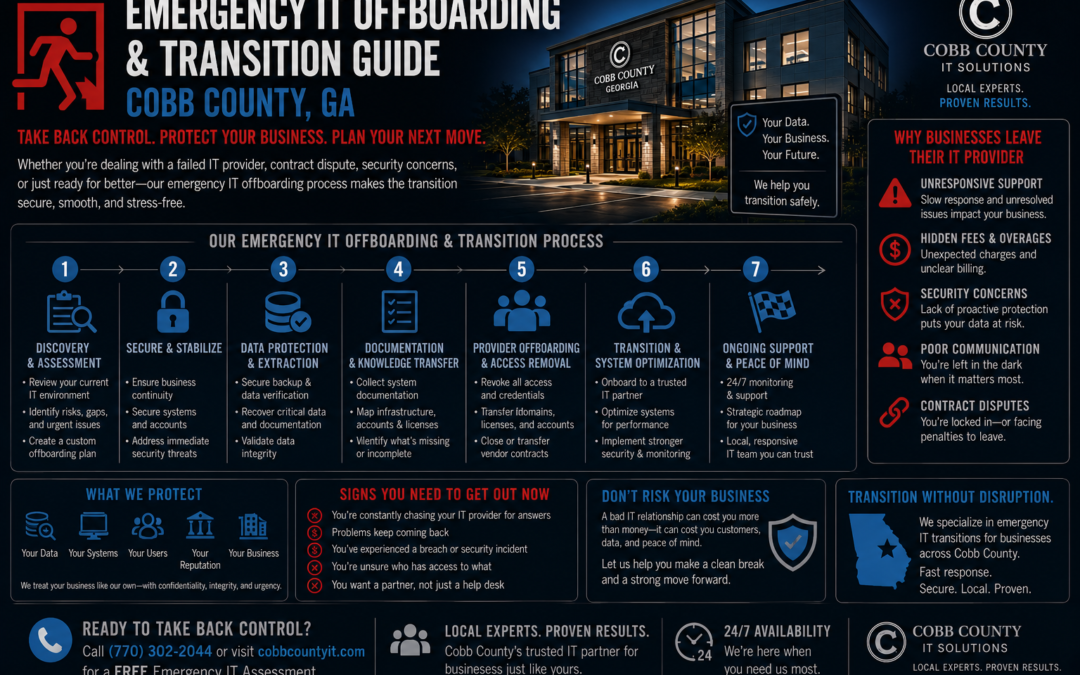
Transition away from reactive, single-administrator IT models. Partner with a provider maintaining an active, local Cobb County presence with engineering depth sufficient to provide flat-rate managed services backed by explicit contractual SLAs. The partner should directly manage the technical handoff—collecting all system credentials, configurations, and licenses while simultaneously conducting an independent audit of your network environment.
Step 3: Implement Automated Technical Safeguards
- Enforce MFA across all corporate resources
- Configure centralized identity management (Microsoft Entra ID or Okta) to enable instant session revocation across all cloud applications
- Deploy SOC-backed EDR software capable of automatically isolating compromised endpoints
- Implement automated daily backup verification following the 3-2-1 rule: three copies of data, on two different media types, with one copy isolated offsite and immutable
Stabilize Your Infrastructure with IT Emergency Room
An IT administrator departure is a measured crisis—one with a defined, executable response protocol. The difference between a controlled transition and a regulatory and financial emergency comes down to whether the right local partner is already in place before the situation occurs.
IT Emergency Room is the Cobb County region's dedicated Tier-3 on-site incident response unit, built specifically for businesses operating across Marietta, East Cobb, and the Dallas Highway and Powder Springs Street commercial corridors. We execute emergency infrastructure audits, identity revocation protocols, cloud log forensics, and compliance remediation—on-site, under SLA, without out-of-state dispatch penalties.
If your IT administrator has departed or you're managing an active infrastructure transition, contact the IT Emergency Room emergency response line now at itemergencyroom.com or call us at (678) 439-9501. Do not wait for a breach to trigger your compliance clock.