
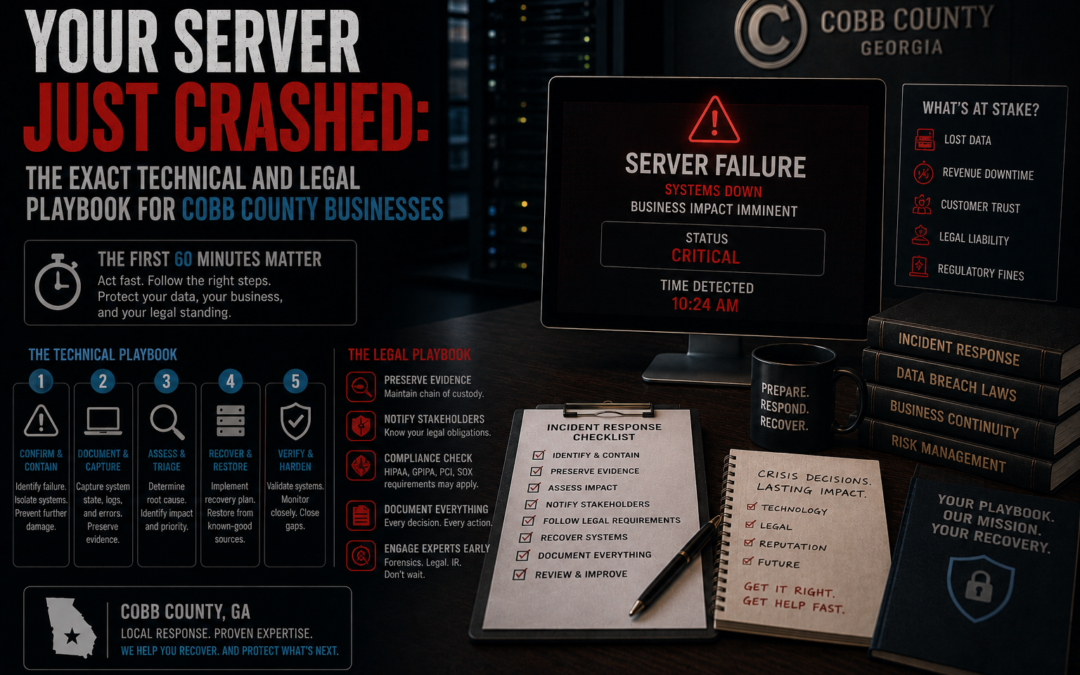
Executive Triage Summary: A physical on-premises server failure triggers a simultaneous cascade of storage controller errors, Active Directory authentication lockouts, and hypervisor VM pauses that cannot be resolved through consumer cloud workarounds or reboots alone. Your first 60 minutes determine whether this is a contained hardware recovery or a federally reportable data breach. Forensic image capture must precede any repair attempt. Call IT Emergency Room's emergency line immediately for on-site Cobb County dispatch.
Key Takeaways
- Event IDs
7,11,55, and16060in your Windows System and Hyper-V VMMS logs are the definitive fingerprints of storage-layer failure causing VM guest pauses — read them before touching anything. - Moving QuickBooks, DICOM, or any relational database into OneDrive/Dropbox during an outage causes permanent, unrecoverable data corruption — not a workaround, a second disaster.
- A 4-hour outage for a 30-person Cobb County firm costs $26,500 in direct idle labor, lost revenue, and emergency recovery overhead — every hour of indecision multiplies that figure.
O.C.G.A. § 10-1-912andHIPAA § 164.308(a)(7)(ii)(C)impose parallel obligations: destroy forensic evidence during a rushed repair and a hardware issue becomes a publicly reportable breach with civil penalties up to $5,000 per day.
What Do the Error Codes Actually Mean When Your Server Goes Down?
When on-premises infrastructure collapses, your workstations tell you exactly what failed — if you know where to look. Drive letters like X:\ and S:\ stop resolving with "network path not found" or "device connection timeout." Line-of-business software crashes at launch because its database connection is severed. Domain logon attempts cycle into prolonged loops or surface "domain controller unavailable" warnings as Active Directory loses its authoritative identity source.
Before running any repair tool, pull the Windows System Event Log and filter for these storage subsystem entries:
| Event ID | Log Source | Severity | What It Means |
|---|---|---|---|
| 7 | Disk / Storage | Error | Bad block or sector failure on the physical drive |
| 11 | Disk / Storage | Error | Hardware controller error on the storage interface |
| 55 | NTFS / File System | Critical | File system structure is corrupt and unusable |
| 98 | NTFS / File System | Error | Volume must go offline for a full repair |
| 129 | RAID / Storage Port | Warning | Storage port reset issued — non-responsive physical drive |
| 153 | Disk / Storage | Warning | I/O retry at a logical block address — drive wearing out |
| 157 | Disk / Storage | Warning | Physical disk surprise-removed or lost connectivity while active |
Run these diagnostics to map the failure boundary before touching hardware:
# Test basic connectivity to the server
ping [server_ip]

# Verify SMB port access — blocked = firewall or NIC failure, not just share issue
Test-NetConnection -ComputerName [server_ip] -Port 445

# Confirm DNS resolution hasn't collapsed — kills AD even if routing is intact
ipconfig /all
Why Did Your Hyper-V Virtual Machines Pause and How Do You Safely Resume Them?
Hyper-V VMs enter a "Paused-Critical" state automatically when the underlying physical volume runs out of space or suffers a storage controller disconnect. This is not a bug — it is the hypervisor protecting active virtual disk files from logical corruption during a write failure. The VM management service blocks all guest OS execution and freezes the memory state until the storage condition is resolved.
Two event IDs confirm this exact condition in your Hyper-V VMMS administrative log:
| Event ID | Severity | State | System Consequence |
|---|---|---|---|
| 16050 | Warning | Pre-critical | VM is about to exhaust physical disk space; write performance degrades |
| 16060 | Error | Paused | VM halted due to disk space exhaustion on the specified path |
Attempting to merge checkpoints or run automated repair directly on the depleted volume fails with error 0x80070070 — insufficient disk space for file consolidation. The correct recovery path: export the virtual machine configuration to an auxiliary storage medium or provision a temporary volume first, then restore. Never force-resume a paused VM without resolving the underlying storage condition — you will corrupt the VHDX.
Why Is Every User Getting Locked Out During the Server Outage?
Authentication lockouts during a server crash are not random — they follow a deterministic failure chain rooted in how Windows handles cached domain credentials. When the primary domain controller (PDC) emulator goes offline, workstations fall back to locally cached credential entries. If a user recently changed their domain password and the cache wasn't synchronized, that stale credential persists locally.
Background services — mapped drives, printer connections, Outlook — keep firing authentication requests using those outdated credentials. Each failed attempt is recorded and transmitted the moment partial DC connectivity is restored. The domain controller sees this burst of bad password submissions, crosses the lockout threshold, and locks the account enterprise-wide.
Diagnostic events to pull immediately:
| Event ID / Code | Source | What It Records |
|---|---|---|
| 4625 | Workstation Security | Failed explicit logon — includes source address, logon type, calling process |
| 4771 | DC Security | Kerberos pre-auth failure — logs failure code 0x18, identifies stale hash source |
| 4740 | DC Security | Account lockout — transmits block across all domain controllers |
| 0xC0000234 | Local Security Authority | Account auto-locked after exceeding invalid logon threshold |
| 0xC000006a | Netlogon Service | Invalid password attempt captured via Netlogon debug interface |
To clear the hidden system-context credentials generating the lockout loop:
:: Open Credential Manager under SYSTEM account to expose hidden network credentials
psexec -i -s rundll32.exe keymgr.dll,KRShowKeyMgr
Delete any corrupted domain or VPN credentials from the Windows Credentials tab. If the local workstation profile itself was corrupted during the crash, clearing the TPM chip resets cached authorization tokens and restores offline credential processing.
To trace the specific calling service triggering lockouts:
:: Enable Netlogon debug logging to identify the rogue authentication source
nltest /dbflag:2080ffffff
Can You Move Your Database to OneDrive or Dropbox During the Outage?
No. Moving a live relational database into a consumer cloud sync folder during a server outage causes permanent, unrecoverable data corruption. This is the single most destructive mistake businesses make in the first hour of a crisis.
QuickBooks Desktop, DICOM imaging databases, and any multi-user line-of-business application rely on precise file-locking semantics — specifically the QuickBooksDBXX service, .ND network descriptor files, and absolute file path structures — to maintain write concurrency and index stability. OneDrive and Dropbox are single-user synchronization tools with no awareness of these dependencies.
| Configuration Variable | On-Premises Server (Correct) | OneDrive/Dropbox (Dangerous) |
|---|---|---|
| Hosting Mode | Multi-user via designated server PC | Workstations attempt local hosting, conflict with sync engine |
| File-Locking | Reliable locks via .ND descriptors and DBxx services |
Missing or delayed lock signals — no real-time write-concurrency |
| File Path Structure | Absolute paths preserved across all workstations | Dynamic paths based on user profile directories break relational links |
| Background Task Handling | Managed directly through database services | Sync tasks block active writes, causing transactional failures |
When the cloud sync engine attempts to upload a file that a database service has open, it creates split-write conditions, corrupts index tables, and alters the absolute path structure the database relies on. Attempting to launch the application after this event usually produces a startup crash. Holding ALT during program initialization can sometimes allow a clean memory load for repair utilities — but this is triage, not recovery. The data lost to cloud sync corruption cannot be restored with basic repair tools.
Software vendors will not help you here. Their standard response: the application is stable; your storage platform collapsed. That is technically accurate and completely useless. The infrastructure failure is yours to resolve.
Does Having Both AT&T Fiber and Comcast as a Backup Guarantee Uptime in Cobb County?
Not if they share the same physical conduit — and in most Cobb County commercial corridors, they do. This is the single-conduit physical path overlap vulnerability, and it is common across the Town Center Kennesaw business parks, East Cobb commercial complexes, and Marietta Square offices.
AT&T and Comcast operate on separate billing entities and distinct network backbones. Their last-mile physical fiber runs and copper cables, however, are routinely pulled through the same underground conduit. A construction crew severing that conduit on Barrett Parkway or a vehicle striking a utility pole eliminates both your primary fiber and secondary coax simultaneously. At that point, your cloud backup access, hosted Desktop-as-a-Service, and primary email are all offline — at the same time your on-premises server is down.
True medium diversity requires bypassing physical wireline infrastructure entirely for your secondary path. A 5G fixed wireless access (FWA) circuit or an external directional cellular antenna array routes traffic over airwaves to geographically distributed towers — a civil engineering incident on a local road cannot sever it.
When both the server and the wire fail simultaneously, remote support cannot reach you. On-site dispatch is the only resolution path.
What Are Your HIPAA and Georgia Legal Obligations When the Server Goes Down?
Every infrastructure collapse must be treated as a potential breach event until forensic analysis confirms otherwise. For medical practices, dental groups, and professional services firms in North Georgia, on-premises servers house Protected Health Information (PHI) and Sensitive Personally Identifying Information (SPII) that trigger parallel federal and state compliance obligations the moment the system goes offline.
HIPAA § 164.308(a)(7)(ii)(C) — Emergency Mode Operation Plan requires documented procedures enabling continuation of critical business processes that protect ePHI security while operating in emergency conditions. This means temporary systems must be isolated, patient data must remain encrypted, and access controls must remain enforced. Routing patient records through unencrypted public folders or leaving clinical notes on unsecured paper violates this mandate — regardless of how brief the emergency.
O.C.G.A. § 10-1-912 — Georgia Personal Identity Protection Act requires notification to affected Georgia residents in the most expedient time possible without unreasonable delay when client data is compromised.
| Regulatory Standard | Primary Mandate | Compliance Action During Outage | Statutory Liability |
|---|---|---|---|
| HIPAA § 164.308(a)(7)(ii)(C) | Written Emergency Mode Operations Plan protecting ePHI availability | Segment temporary networks, enforce role-based access, protect paper records | Federal enforcement, audit penalties, civil class-action |
| O.C.G.A. § 10-1-912 | Expedient notification of data compromise to Georgia residents | Maintain chain-of-custody logs, capture disk images, preserve system metadata | Civil penalties up to $5,000/day for ongoing non-compliance |
The Insider Nuance Most IT Teams Get Wrong
Rushing the repair destroys your legal safe harbor. Many infrastructure failures begin not as hardware errors but as active ransomware encryption events. If your team runs invasive drive sweeps, wipes local machine caches, alters storage partitions, or rebuilds RAID arrays before forensic imaging, you erase the evidence you need to:
- Verify the breach boundary.
- Confirm data was encrypted at rest (the legal standard for invoking the "encryption safe harbor" that waives consumer notification requirements under Georgia law).
- Defend against civil litigation.
A multi-location professional group near Town Center Kennesaw learned this directly. After a total local storage failure, the team bypassed protocols and routed all client operations through an unencrypted consumer cloud backup folder. That single decision converted a standard hardware recovery into a publicly reportable breach under O.C.G.A. § 10-1-912 — triggering regulatory notifications, legal liability, and lasting reputational damage.
Bitwise forensic image capture of all impacted disks, stored on separate offline infrastructure, must occur before any repair tool runs.
What Does a Server Outage Actually Cost Per Hour?
The financial damage from unplanned downtime compounds rapidly and follows a calculable model. For a mid-sized Cobb County professional services firm or clinical practice with 30 employees and $5,000,000 in annual revenue:
$$C_{\text{downtime}} = (E_{\text{affected}} \times W_{\text{loaded}}) + R_{\text{lost}} + C_{\text{recovery}} + C_{\text{long-tail}}$$
Where:
- $E_{\text{affected}}$ = number of affected employees
- $W_{\text{loaded}}$ = fully loaded hourly labor cost per employee
- $R_{\text{lost}}$ = hourly gross revenue lost due to operational halt
- $C_{\text{recovery}}$ = emergency consultant fees and hardware replacement
- $C_{\text{long-tail}}$ = regulatory penalties, data re-entry backlogs, customer churn
4-Hour Outage Financial Model
| Financial Variable | Derivation | Hourly Value | 4-Hour Total |
|---|---|---|---|
| Idle Labor Waste | 30 impacted employees under burdened rate structures | $1,200/hour | $4,800 |
| Gross Revenue Drain | Halted transactional workflows and billable activity | $2,500/hour | $10,000 |
| Emergency Labor Fees | Flat-fee priority remediation deployment overhead | Project-based | $11,700 |
| Total Outage Loss | Direct synthesis of all system variable impacts | $3,500 / hr | $26,500 |
$$C_{\text{downtime}} = (\$1{,}100) + (\$2{,}400) + C_{\text{recovery}} = \$3{,}500\text{ /hr} \times 4\text{ hrs} + \$11{,}700 = \$26{,}500$$
Beyond the initial window, losses compound through operational backlogs, customer churn, and mounting regulatory compliance overhead. Every hour of indecision extends the damage curve.
What Is the Correct Step-by-Step Recovery Protocol?
The Minimum Viable Operations (MVO) framework defines the absolute minimum core infrastructure needed to maintain operations and regulatory compliance while primary systems are restored. Execute in this exact sequence:
Step 1 — Immediate Isolation and Containment
Disconnect network switches and ethernet links to the physical server host. Do not shut down abruptly — forced power-off erases volatile memory and registry data that forensic investigators need. Network isolation contains active threats (lateral ransomware propagation) while preserving system state.
Step 2 — Forensic Image Capture Before Any Repair
Capture bitwise forensic images of all impacted storage disks and store them on separate, offline infrastructure. This is not optional — it is the legal prerequisite for invoking regulatory safe harbors under O.C.G.A. § 10-1-912 and for any subsequent breach defense.
Step 3 — Activate the Emergency Mode Operations Plan
Formally invoke your HIPAA-compliant Emergency Mode Operations Plan. A pre-designated skeleton crew — Crisis Lead, Legal Counsel, Communications Director — assumes administrative control. The technical team establishes an out-of-band communication network on pre-configured channels outside the impacted network environment.
Step 4 — Deploy Clean Standby Infrastructure
On-site dispatch engineers configure an isolated temporary networking platform at your location. Verified, clean database backups are mounted to this isolated environment. Users receive read-only access to client records and patient databases — preventing write conflicts or unauthorized changes during the recovery window.
Step 5 — Execute Minimum Viable Workflows
Staff resume business-critical processes against the clean backup environment. All temporary data entries are recorded with full access controls and auditing enabled, stored in a secure local repository ready for production system import.
Step 6 — Verify Storage Integrity Before Reconnection
Before returning the primary server to the production network: resolve all disk and controller errors, apply OS patches and updated security configurations, complete forensic analysis of isolated storage images, document regulatory compliance, then import emergency-period data into production databases.
Isolate Your Infrastructure with IT Emergency Room
When your server goes down in Cobb County, you have one call to make. IT Emergency Room deploys Tier-3 certified engineers directly to your Kennesaw, Marietta, or East Cobb location — on-site, not remote — to execute forensic containment, deploy isolated standby infrastructure, and restore Minimum Viable Operations without compromising your legal standing under HIPAA or O.C.G.A. § 10-1-912.
Every hour of uncoordinated response adds $3,500 to your loss exposure and narrows your forensic options.